

Features
From finding footage to reviewing the final render.
Find footage by content, filename or tags. Edit proxies in Resolve; add rendering, comments and approval when needed.
01 · Smart Media Search
Find footage by content, filename or tags.
Search connected folders with filters and content-aware results.
AI processing is optional and Windows-only with a supported NVIDIA GPU through beta and version 1.0. Editors search shared analysis without their own AI-processing GPU. Check requirements.


Search, storage & AI requirements
Selected folders can be on computers, drives or NAS. Your Admin controls access. NAS folders must be readable by a connected computer; Nexus is not a native NAS app.
The library and proxy workflow work without AI. AI needs a CUDA-13-compatible NVIDIA GPU with at least 4 GB VRAM and driver 580 or newer. Models require an internet download. Meaning-based matching also needs AI ready on the Coordinator.
Check setup requirements →02 · Edit & Render
Keep editing while another computer handles the render.
Edit imported video/audio proxies in Resolve, even if the source drive disconnects. When needed, offload a render to your Coordinator while you keep editing on a different computer.


Proxy & render requirements
Browsing and new imports need a reachable Coordinator and ready proxies. Imported proxies remain editable if that connection drops. Still images import the original file. Full-quality renders need accessible originals.
On the Coordinator computer, keep the Nexus Coordinator app and supported Resolve Studio running in a signed-in user session. Workers do not render submitted projects. Each submission is a snapshot of the version sent. The timeline needs at least one Nexus-imported clip. Prepare other media, fonts and effects on the Coordinator.
Set up rendering →03 · Review & Comments
Review renders and keep comments together.
The submitting Editor and Admins preview the render and exchange comments in Nexus. Admins approve or reject in the web panel.


Review scope
Review stays inside Nexus between the submitting Editor and Admins. It does not create a public client link or a shared editing timeline.
04 · Editor Access
Choose what each editor can access.
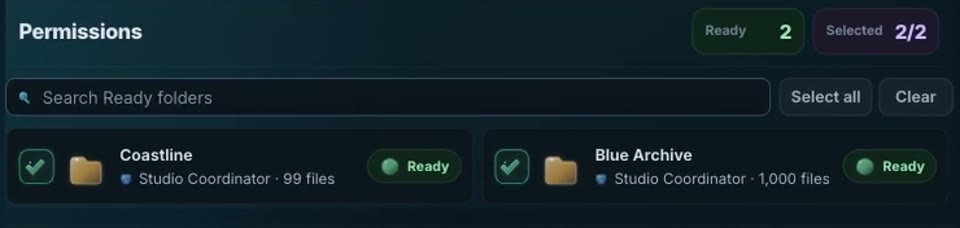
Admins grant folder access in the web panel. Each editor sees only the shared media they have permission to use.
Local, remote & backup boundaries
Your Coordinator holds the library. Local-network use works without internet after setup. Beyond the studio, use a configured private or routed connection; throughput depends on the network. Nexus is not an automatic backup or managed cloud service.
Starting with DaVinci Resolve.
More editor integrations and cloud-storage connections are planned. Availability will be announced after each integration is verified. Check the build’s compatibility before installing.